Connect equipment and system data
to production records.

QFactory links values from PLCs, sensors, barcodes, cameras, ERP, and MES to item, process, and equipment records. People review AI-generated master-data drafts against source documents before saving them. Vision results remain linked to source images.

  • CollectBring values in from ERP, MES, PLCs, sensors, documents, images, and external systems.
  • AttachTie each value to the right customer, order, item, process, machine, and cost record.
  • UsePeople review AI-generated master-data drafts before saving them. Vision and analysis results remain linked to their source evidence for the next task.
  • RecordKeep source documents, calculation rules, permissions, and change history so each result can be reviewed again.

Find gaps between systems and workflows

Start with the places where people retype values, search for missing records, or cannot trace a change.

Existing Equipment

Start with the data your existing equipment can provide.

We collect operating state and production values from the machines you already run, then attach them to work, quality, and equipment records. For older equipment, we begin with the connection method it can support.

See equipment connectivity

Data connectivity, manufacturing AI, and operating records.

Collect data on the floor, connect it to work records, use AI where it helps, and keep people in control.

Site apps

Operators record work where it happens, and the office sees the same value.

Work order review, material issue, production results, inspection entry, and equipment checks are handled on shop-floor screens. That removes the paper-then-spreadsheet-then-system round trip.

Work orders, production results, inspection entry, lot traceability

Manufacturing AI for documents and images

AI drafts master data from documents and produces inspection results from images.

AI drafts master data from documents and produces inspection results from images. Master-data drafts stay linked to source documents, while vision results stay linked to source images.

Document reading, OCR, vision inspection, permission-scoped data search

Repeatable automated tasks

AI and programs handle repetitive work while people review evidence and decide priorities and exceptions.

Master-data drafts built from documents, equipment communication setup, and report generation each run as a defined sequence, and every step leaves a record of what it produced.

Master-data drafting, protocol setup, report generation, schedule and task management

Production and equipment analysis

Review anomalies and possible causes with the supporting data.

Sensor, production, and quality records are checked for anomalies and candidate causes. Programs do the arithmetic; AI drafts the explanation.

Anomaly detection, condition prediction, quality and cost analysis

Equipment and system connections

Older machines do not have to be replaced first. We start from the equipment already in use.

PLCs, sensors, barcodes, and cameras are connected, and data from ERP, MES, spreadsheets, and external APIs is attached to manufacturing records. For meters with no communication port, we are testing camera-based display reading.

Modbus, OPC UA, EtherNet/IP, MQTT, Asset Administration Shells (AAS), data collection and equipment information

Review, access, and change history

People review AI-generated master-data drafts before saving them.

Vision results remain linked to source images. The system records who changed master data and when. Model-version tracking is in development.

User permissions, review steps, change history, audit trail

Delivered projects, pilots, and R&D.

Projects using document reading, vision inspection, equipment data collection, and production management.

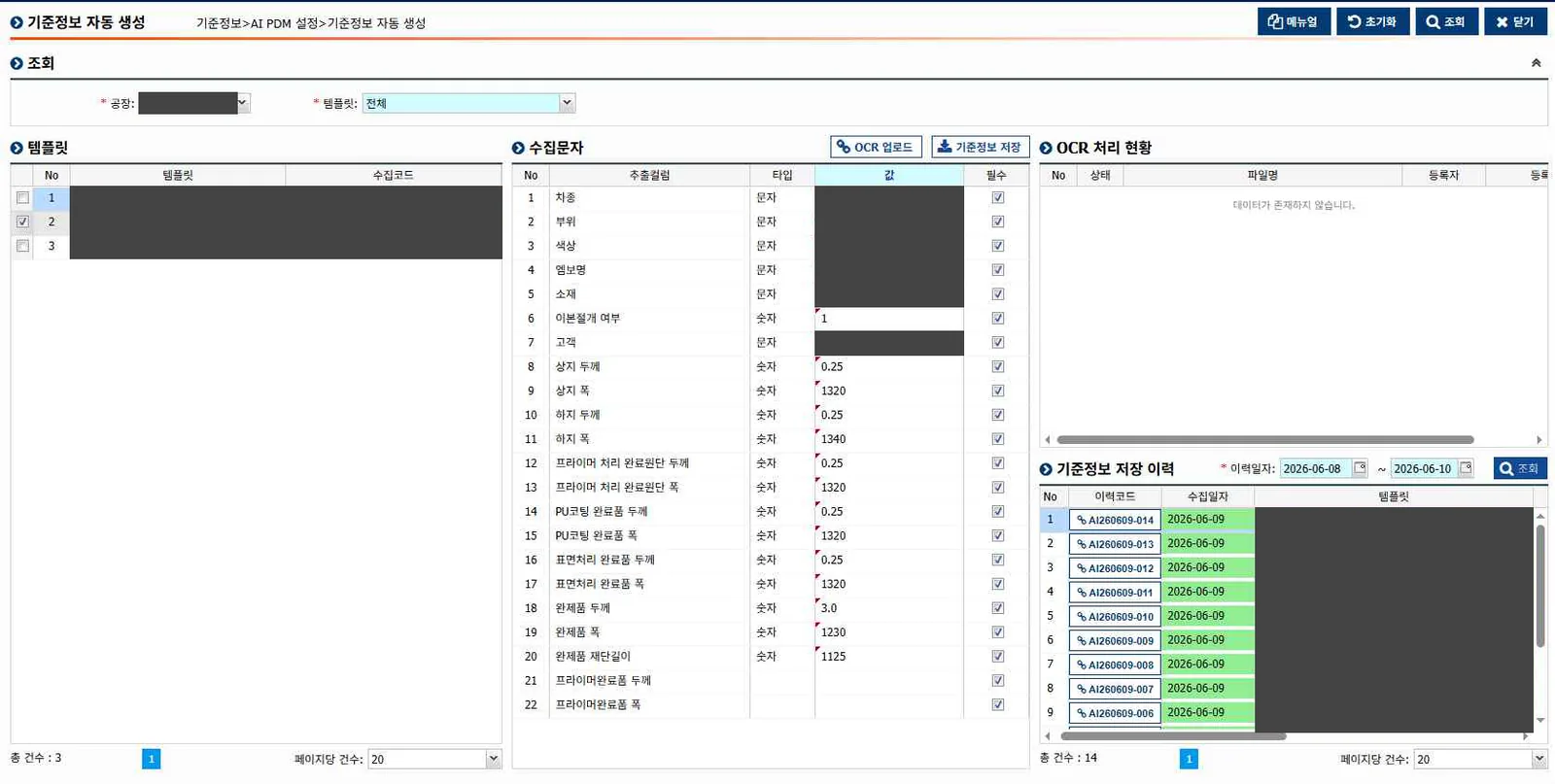
QFactory product screen: An employee reviews values read from a document before saving them as master data.
QFactory product screenAn employee reviews values read from a document before saving them as master data.
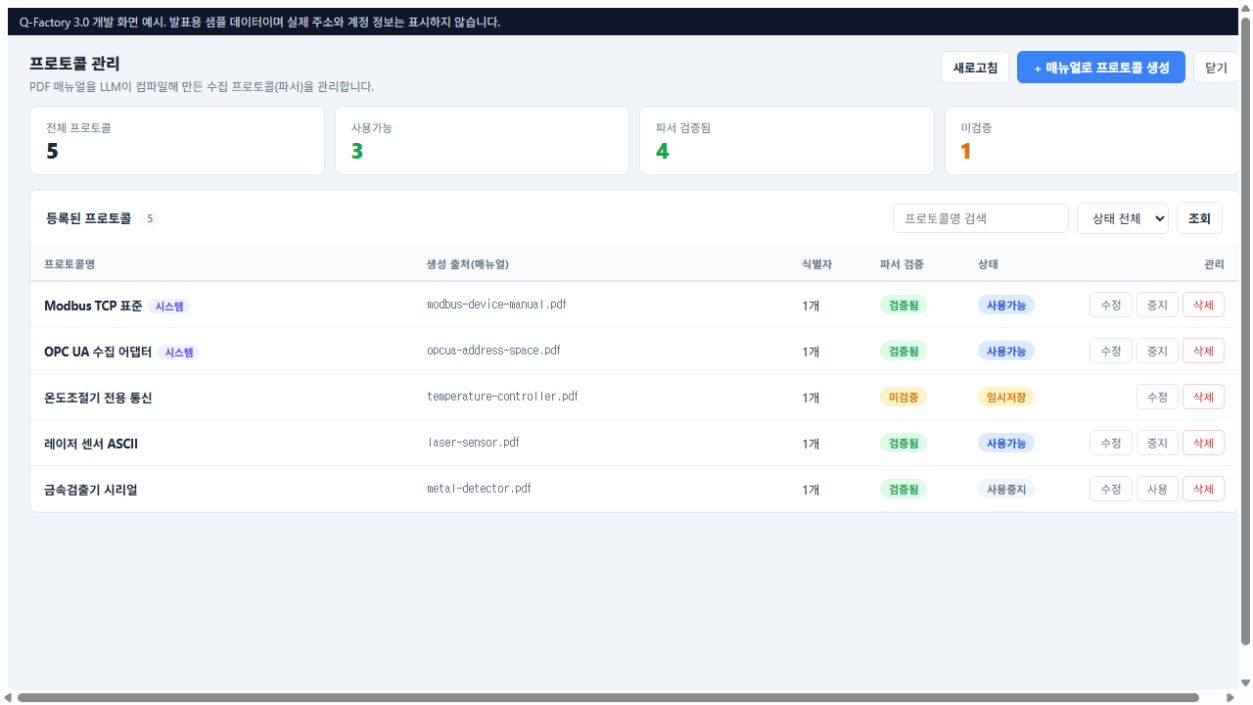
Internal development screen: Communication definitions created from equipment manuals are tested and managed.
Internal development screenCommunication definitions created from equipment manuals are tested and managed.

These are public product materials and internal development materials. They are not customer operating screens.

See the full project recordSee the QFactory product scope

How data is collected and linked to operating records.

Collect each source value and attach it to the right record. People review document-derived master-data drafts before saving, while vision results remain linked to source images.

  1. 01

    Connect

    Use values the current operation already produces. Nothing is invented that the site does not measure.

    Inputs
    PLCs, sensors, barcodes, cameras, ERP and MES, development requests and drawings
    Controlled output
    Raw values tagged with their polling interval, plus the collection history
  2. 02

    Attach values to the work

    A number means nothing until it is attached to an item, a routing step, and a machine. Only then does AI read it.

    Inputs
    Raw values, documents and drawings, video, master data
    Controlled output
    Records linked to items, routings, equipment, and lots, plus master-data drafts, vision results, and analysis results
  3. 03

    Use the result

    People compare document-derived master-data drafts with the source before saving. Vision and analysis results remain linked to evidence when used in the next task.

    Inputs
    Master-data drafts, vision results, and analysis linked to source evidence
    Controlled output
    Saved master data, traceable quality judgments, alerts, and reports
  4. 04

    Control and expand

    Test a small scope first, check the saved records, then move to the next process.

    Inputs
    Execution results and usage records
    Controlled output
    Permissions, change history, audit trail, and the next scope to cover

AI, software, and people have different roles.

AI drafts master data from documents and produces inspection results from images. Calculation software handles exact numbers. People review master-data drafts, set priorities, and handle exceptions.

AI

Understands documents and questions, then finds the relevant evidence across operating records.

Calculation engines

Calculate exact values for cost, inventory, accounting, and production capacity.

Controls and rules

Apply defined equipment commands, operating limits, and workflow rules.

People

Decide customer promises, priorities, risk, approvals, and exceptions.

People review master-data drafts before saving them.

People compare AI-generated master-data drafts with source documents before saving them. Vision results remain linked to source images for later review.

Link the evidence

Master-data drafts remain linked to source documents, and vision results remain linked to source images.

Separate calculation from explanation

Programs calculate cost and output. AI prepares explanations from those validated results.

Use workflow-specific review

People compare master-data drafts with source documents before saving. Vision results remain linked to source images.

What is live, piloted, and still in development

See the scope and current stage of equipment connections, master-data drafts, analysis, vision inspection, reporting, review workflows, and work support.

01Field use and development

Connect equipment and existing systems

Bring values in from PLCs, sensors, robots, cameras, ERP, and MES, then attach them to item, process, and equipment records.

  • Equipment communication and collection health
  • Spreadsheet, PDF, and external-system links
  • Raw values and collection time
What remains in QFactory
Equipment state and raw values are connected to production, quality, and maintenance history.
02Field use and pilot

Draft master data from documents

Read development requests, drawings, and specifications to draft item data, material lists, and routings.

  • Item and specification extraction
  • BOM and routing drafts
  • Employee review against the source
What remains in QFactory
Only reviewed item, BOM, and routing data is saved as master data.
03Project experience and development

Analyze production and equipment data

Find anomalies and candidate causes in production, quality, and sensor records. Define the problem and benchmark before choosing an analysis method.

  • Quality and equipment anomaly detection
  • Sensor change and condition monitoring
  • Comparison of methods and results
What remains in QFactory
The data, analysis conditions, result, and employee review points stay together.
04Project experience and development

Inspect images and read displays

Use camera images to inspect missing parts and surface condition, and read values from gauges and display devices.

  • Missing-part and surface inspection
  • HMI and gauge reading
  • Video checks for safety conditions
What remains in QFactory
The judgment and source image connect to the quality or safety review history.
05Pilot and development

Prepare reports and shop-floor logs

Query real QFactory data to draft tables, charts, and explanations. The scope is expanding to quality, food-safety, and cost reports.

  • Reports by role and question
  • Quality and defect summaries
  • Shop-floor logs and cost-data summaries
What remains in QFactory
The queried data and employee edits remain with the report.
06Field use and development

Review master-data drafts and trace results

Show AI-generated master-data drafts with source documents for review before saving. Keep vision results linked to source images.

  • Source documents and source images
  • Master-data draft correction and saving
  • Permissions and change history
What remains in QFactory
Saved master data and traceable vision results remain connected to their source evidence.
07Operating features and development

QFactory Agent is in development.

Manage schedules, projects, and work status. QFactory Agent is being developed to find information within user permissions and suggest the next review step.

  • Kanban, work logs, and weekly reports
  • Manufacturing-data and company-document search
  • Tool permissions, execution, and approval scope
What remains in QFactory
The planned record will show which information was reviewed and what the system suggested.

Define the first test and its acceptance criteria.

We review your equipment, documents, and systems, then begin with one machine, process, or task.

Plan the first test